Developer Guide
- Table of Contents
Setting up, getting started
Refer to the guide Setting up and getting started.
Design
 Tip: The
 .puml files used to create diagrams in this document can be found in the diagrams folder. Refer to the PlantUML Tutorial at se-edu/guides to learn how to create and edit diagrams.
Architecture
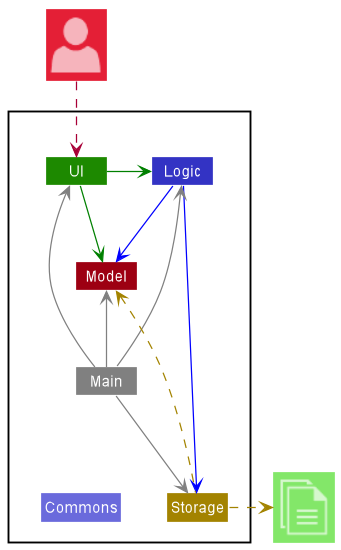
The Architecture Diagram given above explains the high-level design of the App.
Given below is a quick overview of main components and how they interact with each other.
Main components of the architecture
Main has two classes called Main and MainApp. It is responsible for,
- At app launch: Initializes the components in the correct sequence, and connects them up with each other.
- At shut down: Shuts down the components and invokes cleanup methods where necessary.
Commons represents a collection of classes used by multiple other components.
The rest of the App consists of four components.
-
UI: The UI of the App. -
Logic: The command executor. -
Model: Holds the data of the App in memory. -
Storage: Reads data from, and writes data to, the hard disk.
How the architecture components interact with each other
The Sequence Diagram below shows how the components interact with each other for the scenario where the user issues the command delete 1.
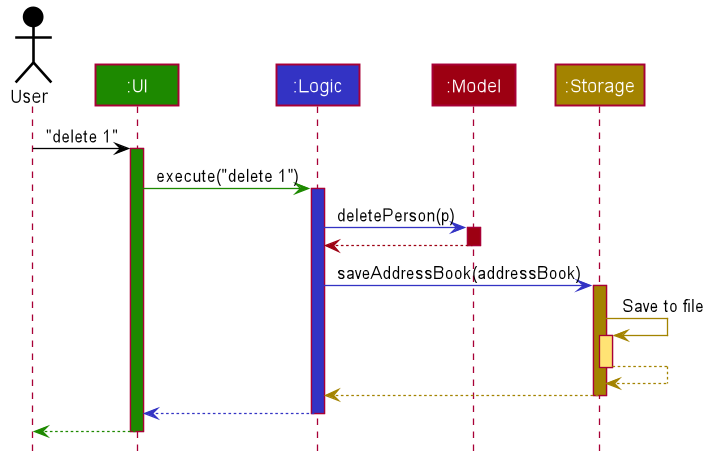
Each of the four main components (also shown in the diagram above),
- defines its API in an
interfacewith the same name as the Component. - implements its functionality using a concrete
{Component Name}Managerclass (which follows the corresponding APIinterfacementioned in the previous point.
For example, the Logic component defines its API in the Logic.java interface and implements its functionality using the LogicManager.java class which follows the Logic interface. Other components interact with a given component through its interface rather than the concrete class (reason: to prevent outside component’s being coupled to the implementation of a component), as illustrated in the (partial) class diagram below.
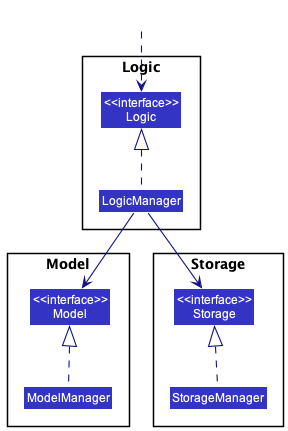
The sections below give more details of each component.
UI component
The API of this component is specified in Ui.java
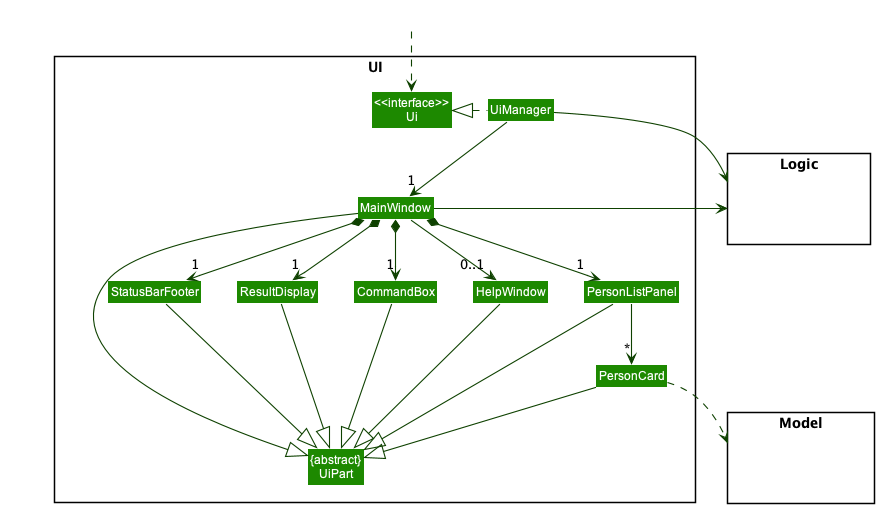
The UI consists of a MainWindow that is made up of parts e.g.CommandBox, ResultDisplay, PersonListPanel, StatusBarFooter etc. All these, including the MainWindow, inherit from the abstract UiPart class which captures the commonalities between classes that represent parts of the visible GUI.
The UI component uses the JavaFx UI framework. The layout of these UI parts are defined in matching .fxml files that are in the src/main/resources/view folder. For example, the layout of the MainWindow is specified in MainWindow.fxml
The UI component,
- executes user commands using the
Logiccomponent. - listens for changes to
Modeldata so that the UI can be updated with the modified data. - keeps a reference to the
Logiccomponent, because theUIrelies on theLogicto execute commands. - depends on some classes in the
Modelcomponent, as it displaysPersonobject residing in theModel.
Logic component
API : Logic.java
Here’s a (partial) class diagram of the Logic component:
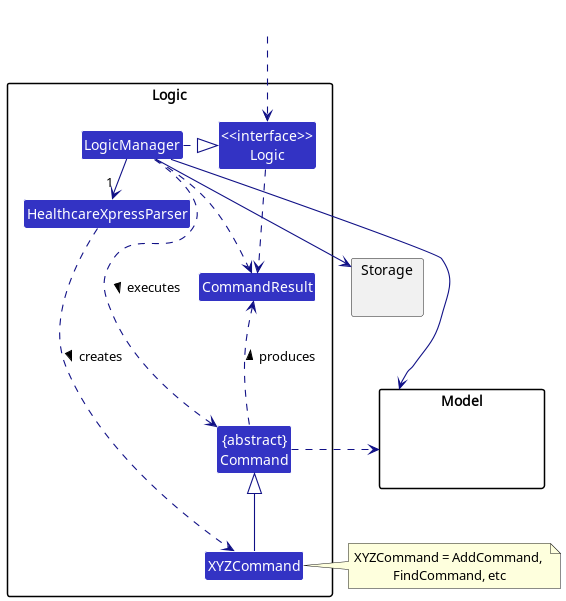
How the Logic component works:
- When
Logicis called upon to execute a command, it uses theHealthcareXpressParserclass to parse the user command. - This results in a
Commandobject (more precisely, an object of one of its subclasses e.g.,AddCommand) which is executed by theLogicManager. - The command can communicate with the
Modelwhen it is executed (e.g. to add a person). - The result of the command execution is encapsulated as a
CommandResultobject which is returned back fromLogic.
The Sequence Diagram below illustrates the interactions within the Logic component for the execute("delete 1") API call.
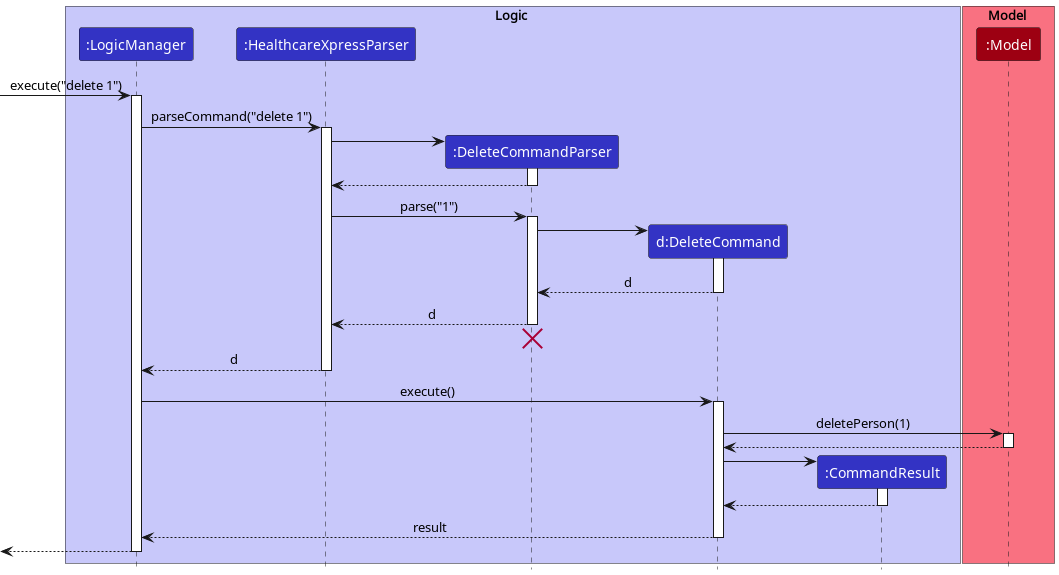
 Note: The lifeline for
 DeleteCommandParser should end at the destroy marker (X) but due to a limitation of PlantUML, the lifeline reaches the end of diagram.
Here are the other classes in Logic (omitted from the class diagram above) that are used for parsing a user command:
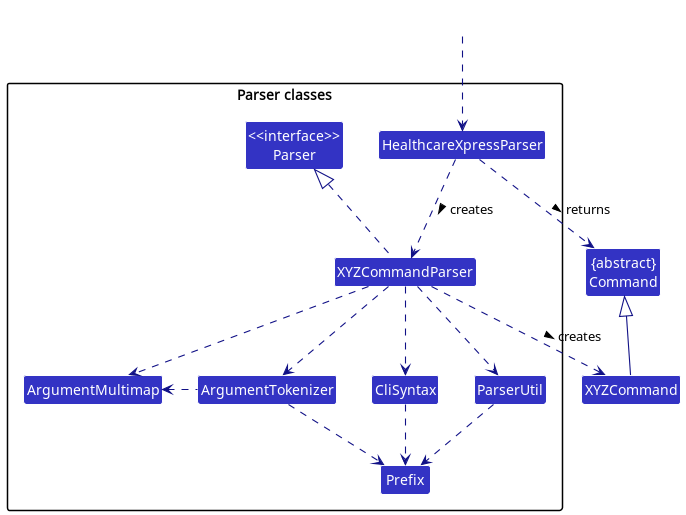
How the parsing works:
- When called upon to parse a user command, the
HealthcareXpressParserclass creates anXYZCommandParser(XYZis a placeholder for the specific command name e.g.,AddCommandParser) which uses the other classes shown above to parse the user command and create aXYZCommandobject (e.g.,AddCommand) which theHealthcareXpressParserreturns back as aCommandobject. - All
XYZCommandParserclasses (e.g.,AddCommandParser,DeleteCommandParser, …) inherit from theParserinterface so that they can be treated similarly where possible e.g, during testing.
Model component
API : Model.java
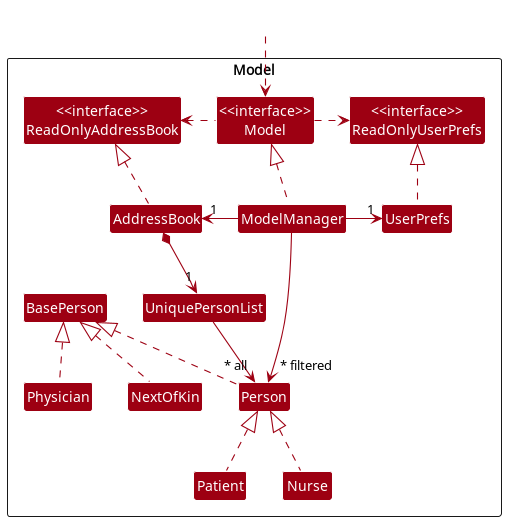
The Model component,
- stores healthcareXpress data i.e., all
Personobjects (which are contained in aUniquePersonListobject). - stores the currently ‘selected’
Personobjects (e.g., results of a search query) as a separate filtered list which is exposed to outsiders as an unmodifiableObservableList<Person>that can be ‘observed’ e.g. the UI can be bound to this list so that the UI automatically updates when the data in the list change. - stores a
UserPrefobject that represents the user’s preferences. This is exposed to the outside as aReadOnlyUserPrefobjects. - does not depend on any of the other three components (as the
Modelrepresents data entities of the domain, they should make sense on their own without depending on other components)
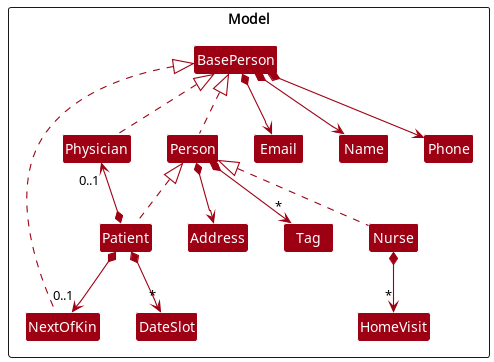
A diagram of the Person class is shown below, for better understanding of the attributes and relations of the different types.
Note: An alternative (arguably, a more OOP) model is given below. It has a Tag list in the AddressBook, which Person references. This allows AddressBook to only require one Tag object per unique tag, instead of each Person needing their own Tag objects.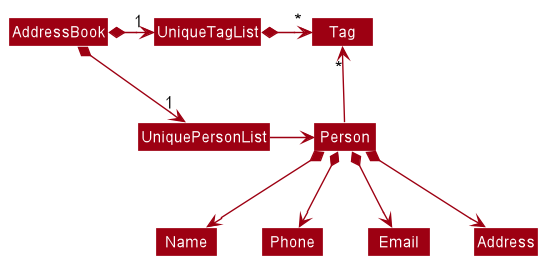
Storage component
API : Storage.java
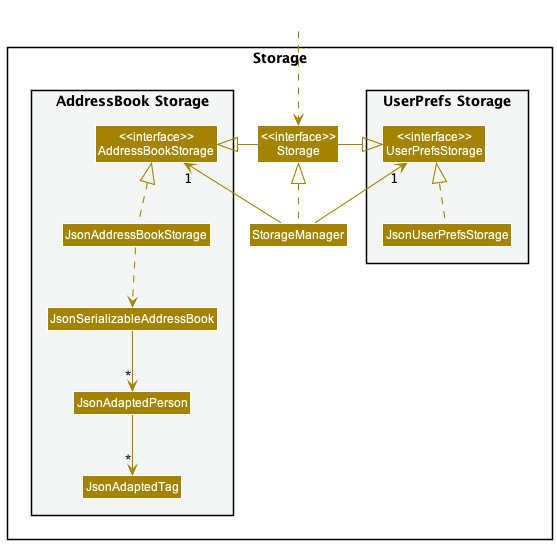
The Storage component,
- can save both address book data and user preference data in json format, and read them back into corresponding objects.
- inherits from both
AddressBookStorageandUserPrefStorage, which means it can be treated as either one (if only the functionality of only one is needed). - depends on some classes in the
Modelcomponent (because theStoragecomponent’s job is to save/retrieve objects that belong to theModel)
Common classes
Classes used by multiple components are in the seedu.addressbook.commons package.
Implementation
This section describes some noteworthy details on how certain features are implemented.
Unique ID Mechanism
Motivation:
Individuals who are modelled by the subclasses of Person may have very similar attributes, such as name, gender and tags. As such there is a high chance that the medical administrator may be confused when looking at similar persons. Thus, a unique id (UID) was introduced to act as the differentiator for such persons.
Implementation for unique ID:
The unique ID mechanism is facilitated by the Uid class. The Uid instance utilizes the AtomicLong class and ensures that unique Uid are used throughout the system.
Originally there was a UidManager class which facilitated the generation and implementation of ensuring that there is no repeated Uid objects. However, this was later refactored to utilize the AtomicLong class.
Add feature
Implementation for adding a patient:
The add patient mechanism is facilitated by Patient, AddCommandParser,AddCommand, Model, AddressBook and UniquePersonList.
Patient extends from Person. A Patient has the Person attributes and a dateSlotList. This is shown in the diagram below:
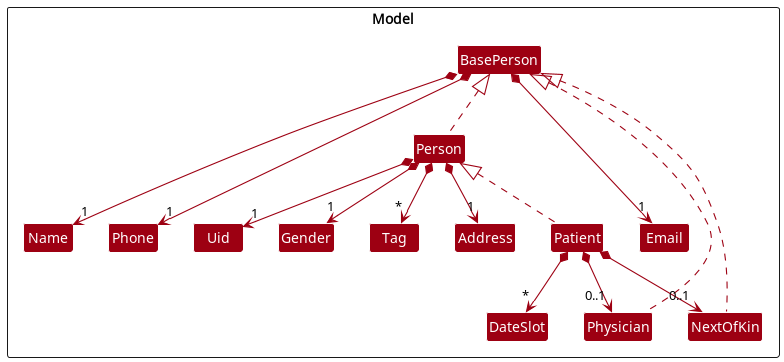
The AddCommandParser takes in user input, extracts information and creates a Patient.
The AddCommand will then be executed, adding the Patient to the Model’s AddressBook’s UniquePersonList.
Given below is an example usage scenario and how the add patient mechanism behaves at each step.
Step 1. The user executes add c/P n/Lily g/F p/91103813 a/ABC STREET 111 e/lily@gmail.com t/heartDisease ds/2022-10-10,3 command to add a new patient that requires nurse’s home-visit.
Note: The c/P is needed to indicate that the person added is a patient.Name, Gender, Phone, Address, Email is compulsory but Tag and DateTime has been made optional. The n/, g/, p/ … are the prefixes used to extract different details’ field of the patient.
Step 2. The HealthcareXpressParser will parse the user command to return an AddCommandParser with the patient’s details.
Step 3. The AddCommandParser will parse the respective patient’s details using fixed prefixes and check their validity. The Uid for the patient will also be generated and used along with the parsed patient’s details to create a patient if all the inputs are valid. Then, it returns an AddCommand with the patient created.
Step 4. The AddCommand will be executed and the patient will be added to the Model’s AddressBook’s UniquePersonList. In the UniquePersonList, potential duplication will be checked.
The following sequence diagram shows how the add patient operation works:
Note: For simplification purpose, c/P n/Lily g/F p/91103813 a/ABC STREET 111 e/lily@gmail.com t/heartDisease ds/2022-10-10,3 will be written as userInput and all the parsed patient’s details will be written as patientDetails.
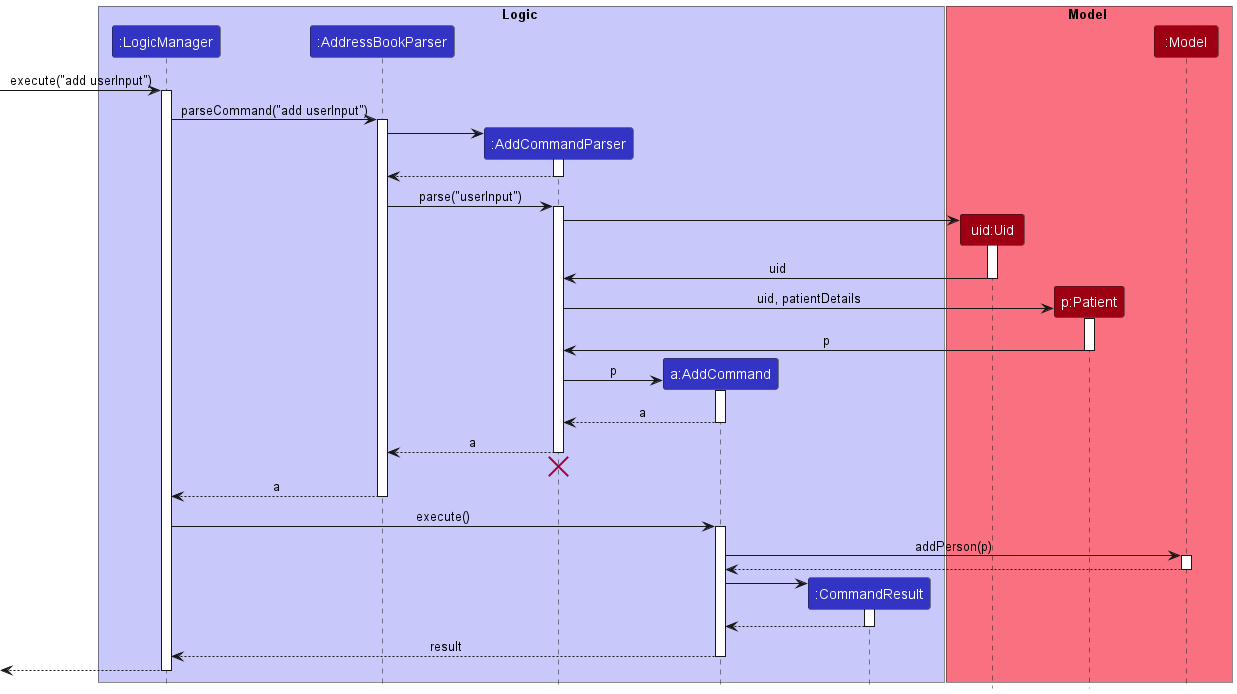
Step 5. The LogicManager will then call saveAddressBook() to store the new updated AddressBook so that the data of the new patient can be retrieved later.
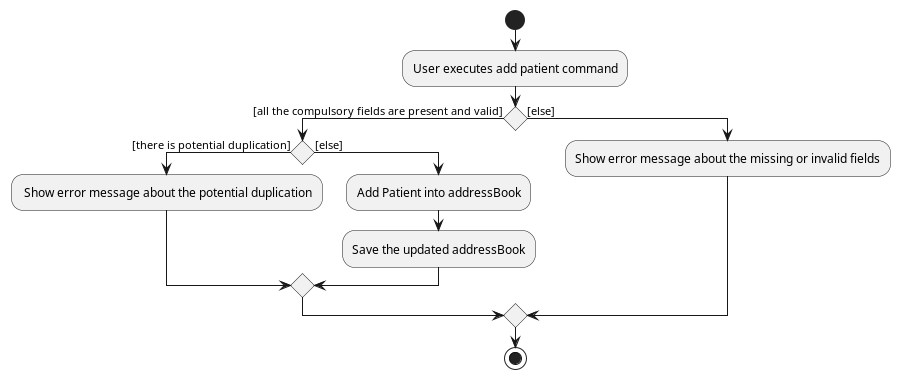
The following activity diagram summarizes what happens when a user executes an add patient command:
Design considerations:
Aspect: How to deal with duplication:
-
Alternative 1: Check the name. If the name is the same, then show duplicate error and do not proceed to add the patient.
- Pros: Easy to implement.
- Cons: If the 2 different patients have the exact same name, the user would not be able to add that patient.
-
Alternative 2: Check the name. If the name is the same, then show duplicate warning but that patient would still be added.
- Pros: If the 2 different patients have the exact same name, the user would still be able to add that patient. At the same time, it will show potential duplication to the user.
- Cons: The user have to manually check whether it is the same person and delete it if it is a duplication.
- Cons: The user might miss out the duplicated patients.
-
Alternative 3 (Chosen): Check the similarity levels by comparing attributes of both people. If there is only a zero or one field difference between the two, then show duplicate warning but that patient would still be added
- Pros: By comparing similarity levels, it reduces the chances of actually having a duplicate, which means that if the warning appears then there is a high chance that it is an actual duplicate, not a false duplicate with only same name.
- Cons: The user would still have to manually delete if it is a duplicate.
Aspect: The home-visit DateTime input:
-
Alternative 1: The
DateTimeinput is in the format ofYYYY-MM-DDTHH:mmand it can in any time.- Pros: More specific date and time recorded for the patient.
- Pros: More flexible in the home visit date and time that a patient can choose.
- Cons: It is hard to determine/check time crashes when assigning a home-visit
DateTimeto a nurse.
-
Alternative 2 (Chosen): The
DateTimeinput will be in the format ofYYYY-MM-DDand slot. The slot will have fixed starting time and fixed duration.- Pros: It is easy to determine/check time crashes when assigning a home-visit
DateTimeslot to a nurse. - Cons: Less flexible in the home visit date and time that a patient can choose.
- Pros: It is easy to determine/check time crashes when assigning a home-visit
Unmark feature
Implementation for unmarking home visits between Nurses and Patients
The unmarking mechanism is facilitated by Patient, Nurse, UnmarkCommandParser, UnmarkCommand, Model, AddressBook, and UniquePersonList.
The HealthcareXpressParser will take in user input and recognise it as an UnmarkCommand, and pass on the user input to UnmarkCommandParser.
UnmarkCommandParser will then identify the Patient of interest, by parsing the uid provided by the user.
UnmarkCommandParser will also identify the dateslot index given by the user.
UnmarkCommandParser returns an UnmarkCommand.
Upon execution, the UnmarkCommand will check if the uid refers to a valid patient. If so, it will unmark the dateslot at the specified dateslot index.
Given below is an example usage scenario and how the unmark mechanism works.
Step 1. The user enters the command unmark id/1 dsi/1 command to unmark the home visit at dateslot index 1, of the Patient with uid of 1.
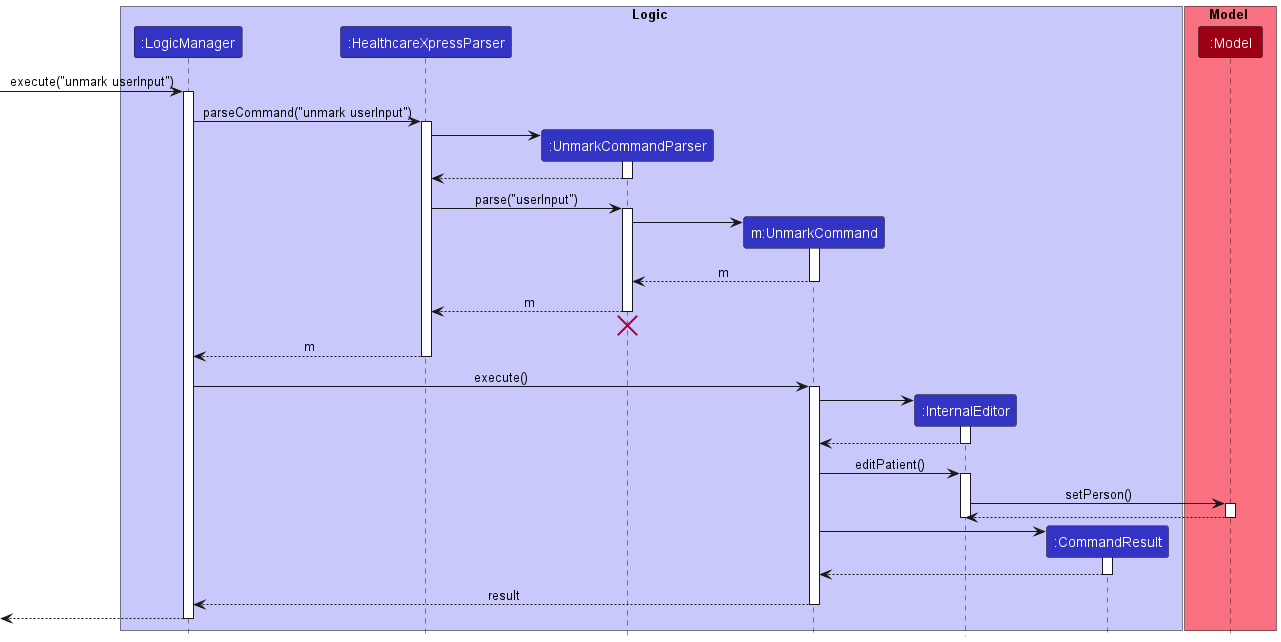
Step 2. The HealthcareXpressParser will parse the user command and pass the input to the UnmarkCommandParser
Step 3. The UnmarkCommandParser will parse the uid and dateslot index, and ensure that both are present. It will then return an UnmarkCommand with the uid and dateslot index.
Step 4. The UnmarkCommand will execute, creating an InternalEditor to update the dateslot list of the patient with the dateslot at the specified dateslot index unmarked.
The following sequence diagram shows how unmarking a dateslot works:
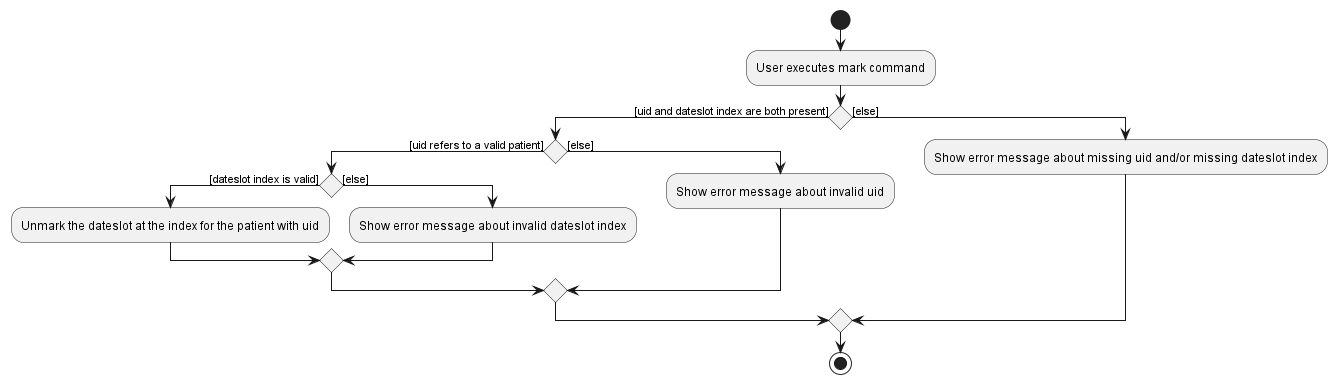
The following activity diagram shows what happens when a user unmarks a dateslot.
Design considerations:
** Aspect: Unmarking DateSlots that have not been marked: **
-
Alternative 1: Print and error message to inform the user that the dateslot has not been marked.
- Pros: User will be made aware that they have probably erroneously unmarked the wrong dateslot, and make the necessary correction.
- Cons: More difficult to implement, requires more thorough testing.
-
Alternative 2: Make no changes and raise no exceptions.
- Pros: Easier to implement and test.
- Cons: User may have erroneously unmarked the wrong dateslot, and may not notice.
Undounmark feature
Implementation for remarking dateslots of Patients
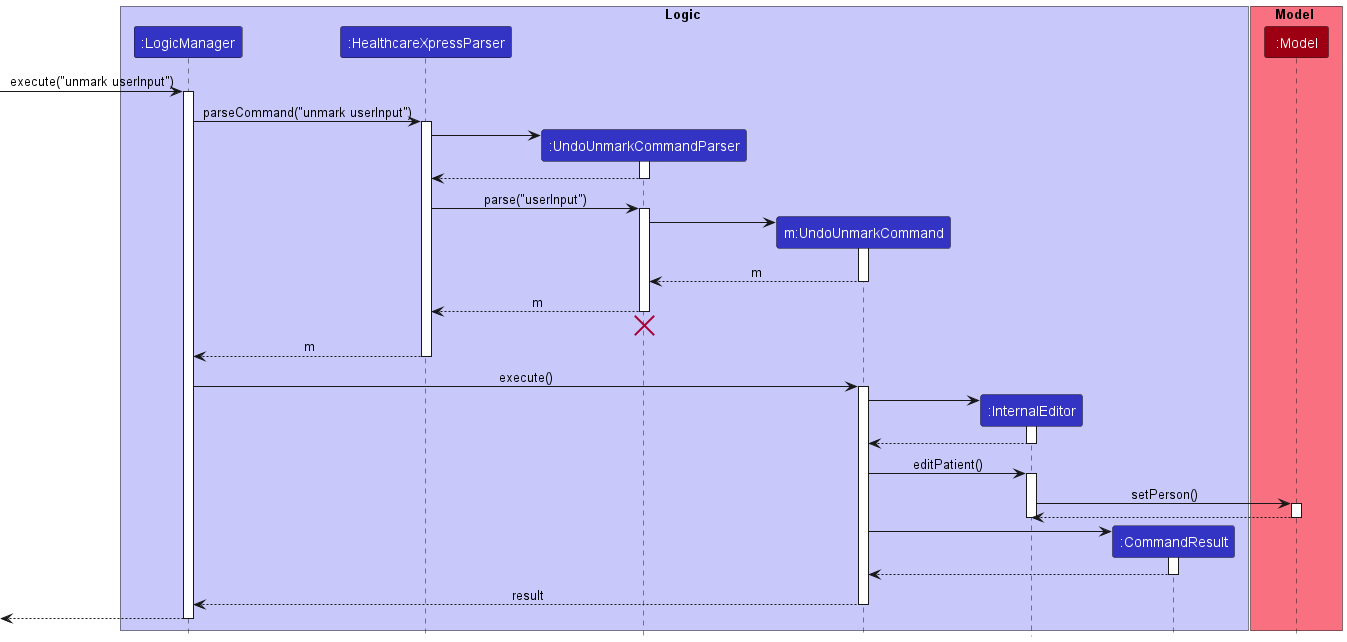
The undo unmarking mechanism is facilitated by Patient, Nurse, UndoUnmarkCommandParser, UndoUnmarkCommand, Model, AddressBook, and UniquePersonList.
The HealthcareXpressParser will take in user input and recognise it as an UndoUnmarkCommand, and pass on the user input to UndoUnmarkCommandParser.
UndoUnmarkCommandParser will then identify the Patient of interest, by parsing the uid provided by the user.
UndoUnmarkCommandParser will also identify the dateslot index given by the user.
UndoUnmarkCommandParser returns an UndoUnmarkCommand.
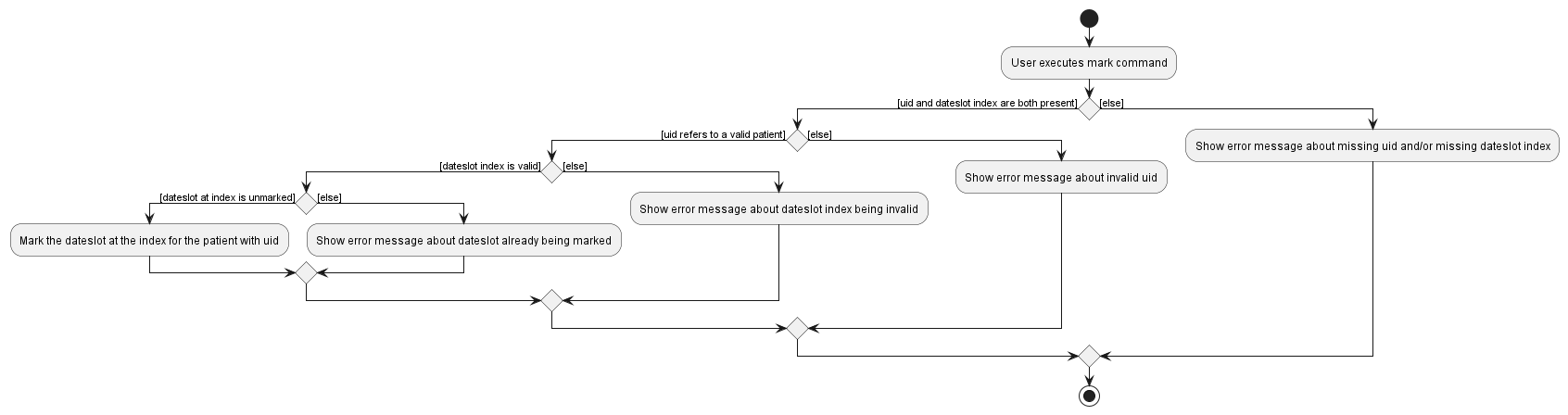
Upon execution, the UndoUnmarkCommand will check if the uid refers to a valid patient. If so, it will check if the dateslot at the specified dateslot is currently marked. If it is unmarked, it will undo the unmarking.
Given below is an example usage scenario and how the undo unmark mechanism works.
Step 1. The user enters the command undounmark id/1 dsi/1 command to undo the unmarking of the dateslot at index 1 of the dateslot list of the Patient with uid of 1.
Step 2. The HealthcareXpressParser will parse the user command and pass the input to the UndoUnmarkCommandParser
Step 3. The UndoUnmarkCommandParser will parse the uid and dateslot index, and ensure that both are present. It will then return an UndoUnmarkCommand with the uid and dateslot index.
Step 4. The UndoUnmarkCommand will execute, creating an InternalEditor to update the dateslot list of the patient with the dateslot at the specified dateslot index marked.
The following sequence diagram shows how undoing an unmarking works:
The following activity diagram shows what happens when a user undos an unmark.
Design considerations
** Aspect: Undo unmarking DateSlots that have already been marked: **
-
Alternative 1 (chosen): Print an error message to inform the user that the dateslot has been marked.
- Pros: User will be made aware that they have probably erroneously marked the wrong dateslot, and make the necessary correction.
- Cons: More difficult to implement, requires more thorough testing.
-
Alternative 2: Make no changes and raise no exceptions.
- Pros: Easier to implement and test.
- Cons: User may have erroneously marked the wrong dateslot, and may not notice.
List feature
Implementation for listing patients and nurses based on specified criteria
The list user function is primarily facilitated by ListCommandParser,ListCommand. Model and Person are also involved.
ListCommandParser takes in user input and extracts the specified criteria that the user wants.
The criteria are then passed to ListCommand which will create a Predicate based on the given criteria.
This Predicate is passed to Model, which will filter and display the enrolled users who match the given criteria.
Given below is an example usage scenario and how the list function behaves at each step. It is illustrated with the following sequence diagram:
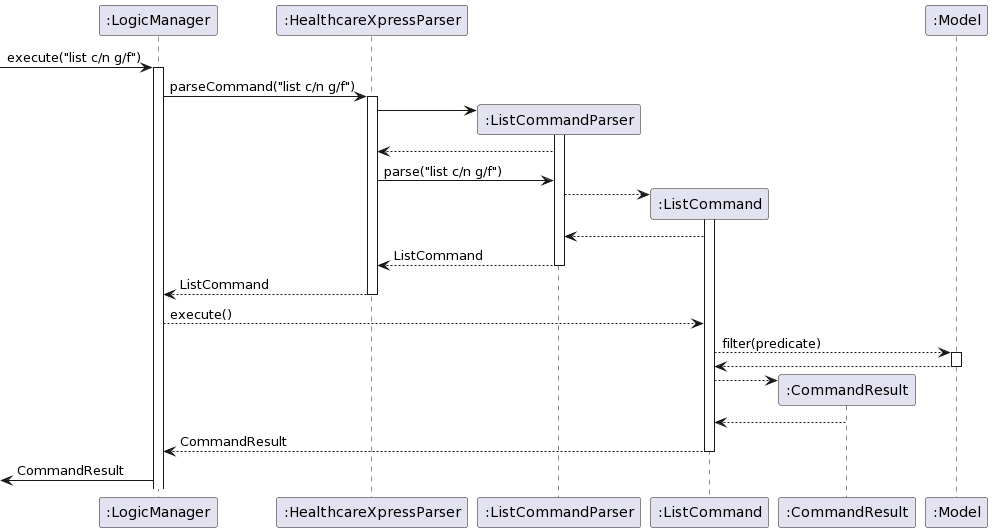
Step 1. The user executes list c/n g/f to list all female nurses.
Step 2. HealthcareXpressParser parses the user command to return a ListCommandParser with the given criteria.
Step 3. The ListCommandParser parses the criteria using fixed prefixes and check their validity. Then, it returns an ListCommand with the criteria category=N, gender=F.
Step 4. The ListCommand will be executed and a Predicate of category=N, gender=F is created and passed to Model.
Step 5. Model applies the Predicate and filters the list of enrolled users, displaying all female nurses only.
The following activity diagram summarizes what happens when a user executes the list command:
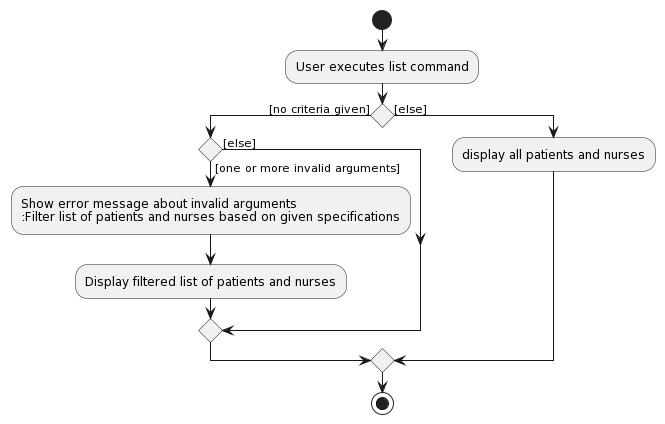
Design considerations:
Aspect: Dealing with one invalid input amoung multiple valid inputs:
-
Alternative 1 (Chosen): Verify validity of all inputs. If an input is invalid, ignore it and list based on the other given inputs, giving a user warning.
- Pros: It might be more convenient for the user in certain circumstances where exact criteria matching is not vital.
- Cons: The user might think that the returned list fits the given criteria exactly, which might lead to user errors.
-
Alternative 2: Verify validity of all inputs. If an input is invalid, do not process the command.
- Pros: If a list is returned then the user can be sure that all returned users match the given criteria exactly.
- Cons: Possibly inefficient if exact matching is not vital.
Update Emergency Contacts feature
Implementation for updating attending physician and next of kin contact information for patients:
The feature is primarily facilitated by UpdateContactCommand and UpdateContactCommandParser.
UpdateContactCommandParser takes in user input, extracts contact info and passes it to UpdateContactCommand.
UpdateContactCommand creates a new NextOfKin or Physician, based on whichever one the user specified.
The new NextOfKin or Physician will have the contact details as stated by the user.
UpdateContactCommand then gets the Patient from the database and edits the Patient to include the new contact.
The new Patient, with the contact info, is then passed to Model, so that the details are saved in the database.
Given below is an example scenario and how the UpdateContactCommand behaves at each step,
illustrated with the following sequence diagram:
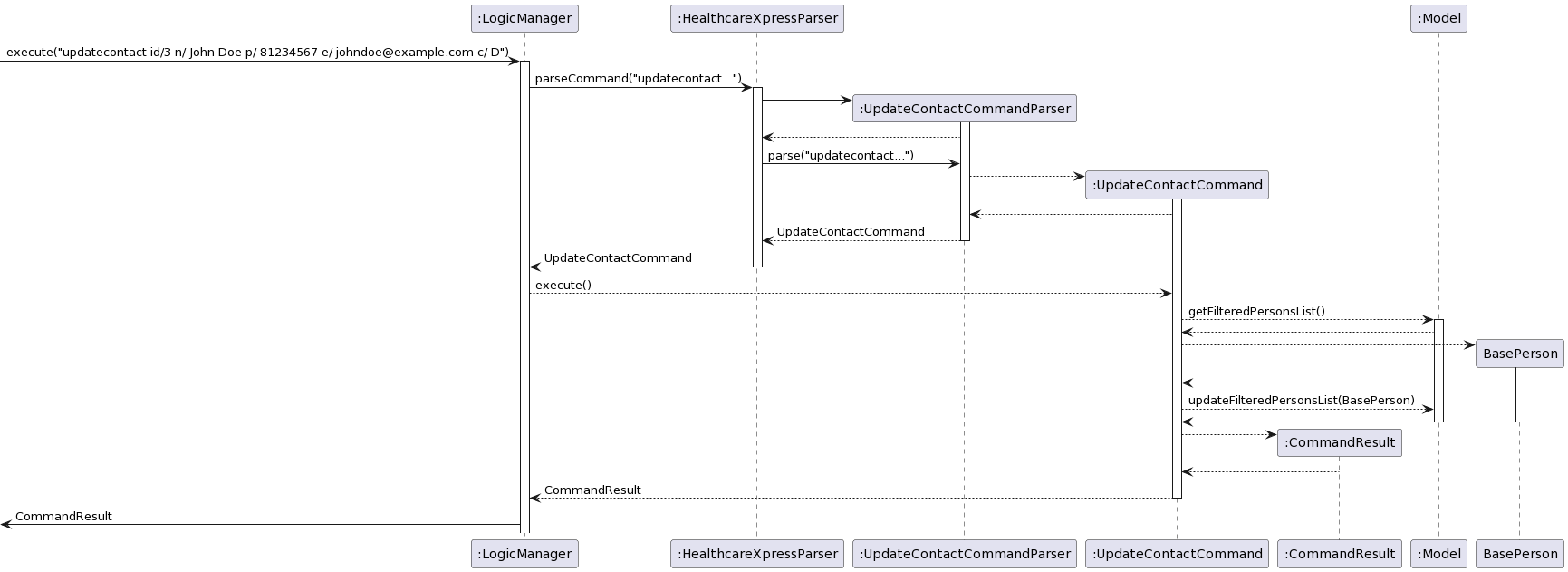
Step 1. The user executes updatecontact id/3 n/ John Doe p/ 81234567 e/ johndoe@example.com c/ D
Step 2. HealthcareXpressParser creates an UpdateContactCommandParser to parse the arguments.
Step 3. UpdateContactCommandParser checks validity of the given arguments and creates an UpdateContactCommand.
Step 4. The UpdateContactCommand is executed, and a new Physician with the given contact info is created`.
Step 5. UpdateContactCommand gets Patient with UID 3 from the database, and updates the Patient to contain
Physician John Doe.
Step 6. Model updates the database, and displays the attending physician on Patient UID 3.
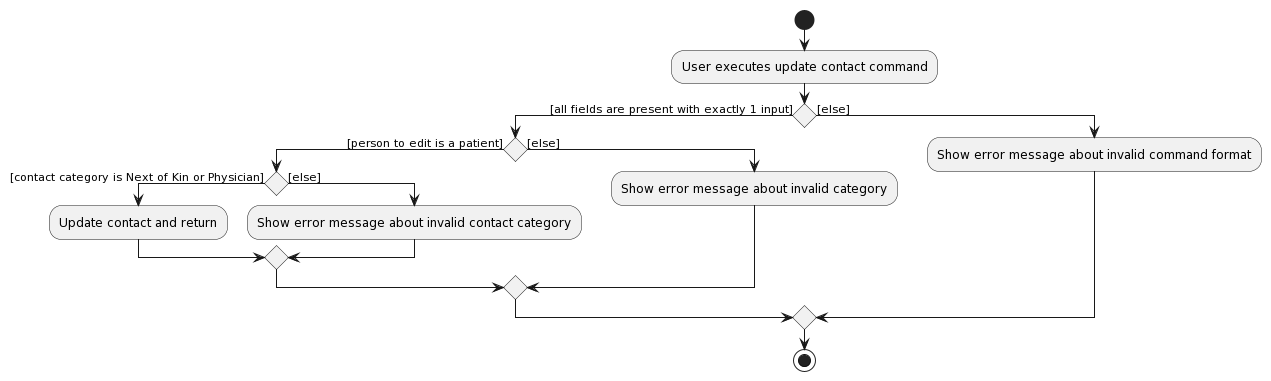
The activity diagram below summarises exception handling of UpdateContactCommand:
Assign Feature
Motivation:
- The assign feature is necessary so that the medical administrator can visually see which nurse is attending which patient’s home visit.
Implementation:
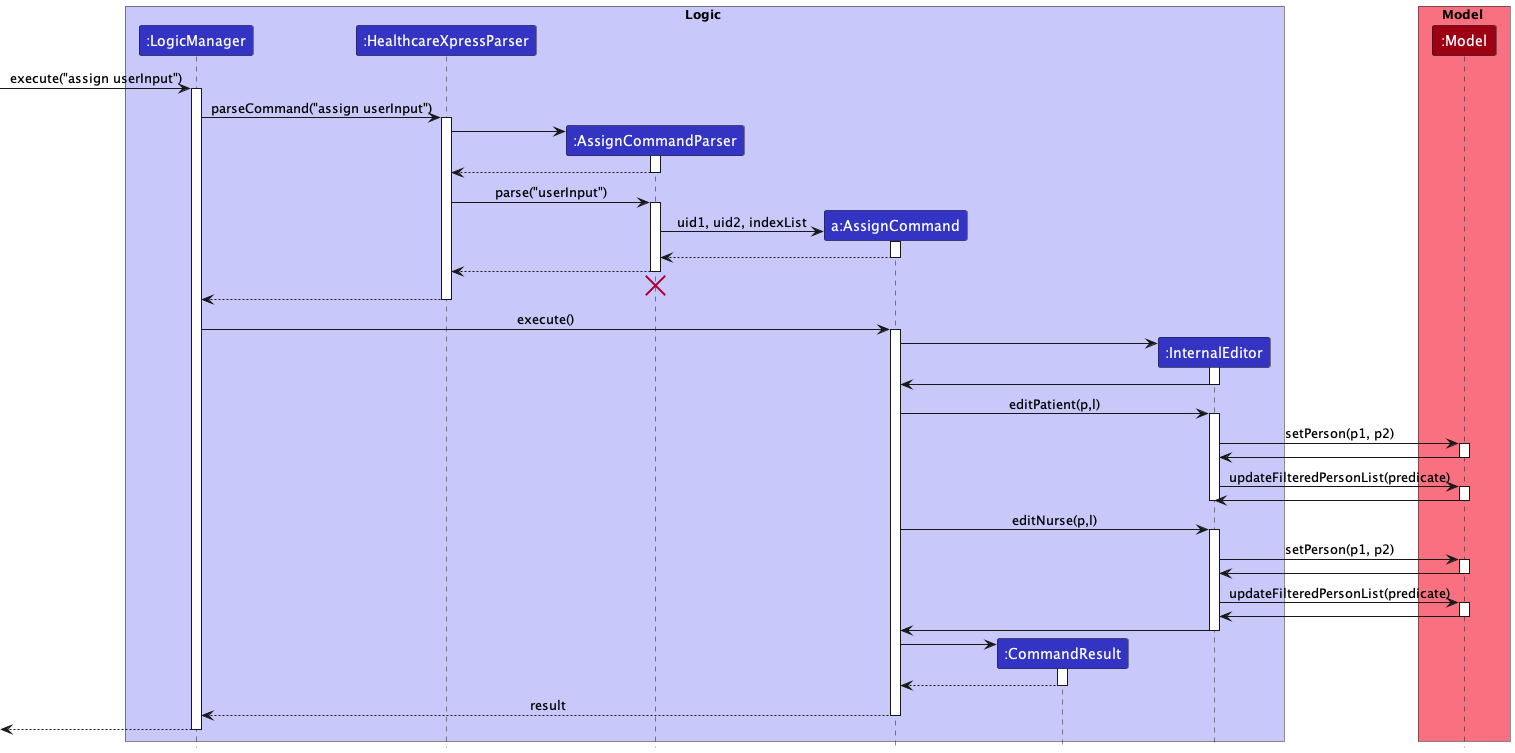
Step 1. The user executes assign id/3 id/2
Step 2. HealthcareXpressParser creates an AssignCommandParser to parse the arguments.
Step 3. AssignCommandParser checks validity of the given arguments and creates an AssignCommand.
Step 4. The AssignCommand is executed, and a new InternalEditor is created.
Step 5. AssignCommand calls the InternalEditor’s methods of editPatient and editNurse.
Step 6. Model updates the database, and displays all the persons.
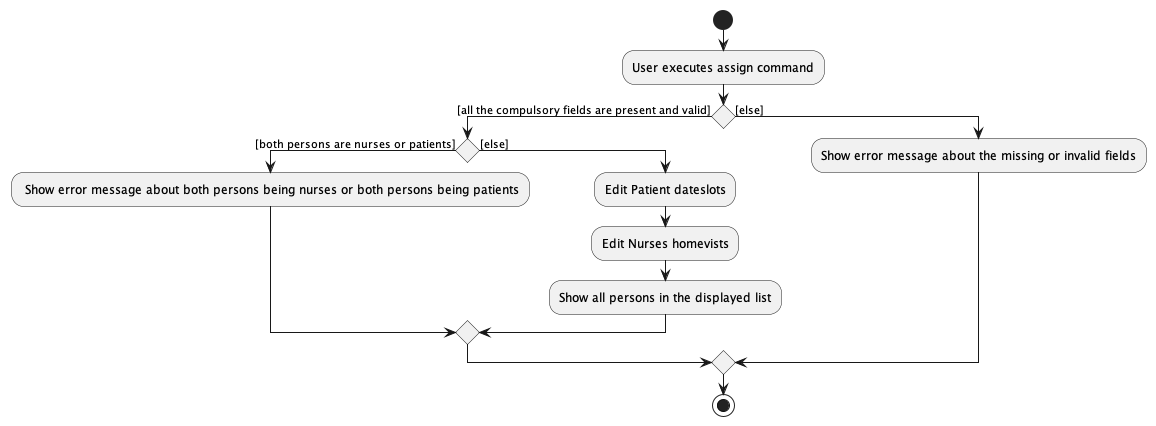
The activity diagram below summarises exception handling of AssignCommand:
Design considerations:
-
Aspect: How the parse interprets the order of uids
-
Alternative 1: Fix the order of the uid, so patient then nurse
- Pros: There will be less checking needed to deduce the class of the persons involved.
- Cons: The user experience will suffer as the medical administrator might not be able to accurately remember which uid corresponding to which person, the nurse or the patient.
-
Alternative 2: Have no fix order, as long as one nurse uid and one patient uid is inputted
- Pros: The user experience will be better as there will be more leeway.
- Cons: Harder to implement and more testing is required.
-
Alternative 1: Fix the order of the uid, so patient then nurse
Deassign Feature
Motivation:
- The deassign feature is necessary so that the medical administrator deassign a nurse to a patient’s home visit if a mistake has been made or changes are necessary.
Implementation:
Step 1. The user executes deassign id/3
Step 2. HealthcareXpressParser creates an DeassignCommandParser to parse the arguments.
Step 3. DeassignCommandParser checks validity of the given arguments and creates an DeassignCommand.
Step 4. The DeassignCommand is executed, the person with the id of 3 will have their home visits deassigned.
Step 5. Model updates the database, and displays all the persons.
Documentation, logging, testing, configuration, dev-ops
Appendix: Requirements
Product scope
Target user profile:
- medical administrator who has a need to manage a significant number of patients and nurses
- prefer desktop apps over other types
- can type fast with precision
- prefers typing to mouse interactions
- is reasonably comfortable using CLI apps
Value proposition: manage patient nurse relations faster than a typical mouse/GUI driven app
User stories
Priorities: High (must have) - * * *, Medium (nice to have) - * *, Low (unlikely to have) - *
| Priority | As a … | I can … | So that … |
|---|---|---|---|
* |
medical administrator | export a current week’s schedule for nurses so that | they can check their schedules independently |
* * * |
medical administrator | quickly add the details of a patients that require home visits so that | retrieve them later |
* * * |
medical administrator | quickly add the details of the nurse | retrieve them later for matching |
* * * |
medical administrator | add the health conditions (eg heart disease, asthma, paralysed etc) of the patients as tags | use this information to match the patient with the respective nurse that has experience in dealing with such disease |
* * |
medical administrator | add a list of diseases that the nurse dealt with before as tags | give them the appropriate patient for a home visit |
* * * |
medical administrator | add patients to the existing list of patients that the nurse is going to home visit for the current week | use it to create the schedule for the nurse |
* |
medical administrator | add the availability of the nurse | use this information to assign the patient to them |
* * * |
medical administrator | add the date (and time + duration) of home visit appointments for the patient | schedule the nurses accordingly |
* |
medical administrator | add next of kin particulars for a patient | inform them in case of any emergency |
* |
medical administrator | add the contact details of the patient’s attending physician | liaise with them regarding the patient’s treatments and how the patient responds to them |
* * |
medical administrator | add patients’ critical information | quickly identify any essential information that needs to be taken note of during scheduling |
* |
medical administrator | store a nurse’s schedule in a specific folder with the nurse’s name as the individual file’s name | |
* |
medical administrator | create a file with the nurse’s name for later storage of the schedule | |
* * * |
medical administrator | store all the information of the patient and nurse in respective files | |
* * * |
medical administrator | delete a patient who no longer requires home visits | I do not need to include them in the scheduled exercise |
* * * |
medical administrator | delete the nurse that is no longer in this department | I would not schedule an unavailable nurse |
* * |
medical administrator | check how many patients are not yet scheduled for the current week ( /for a certain period) | I know whether I have finished scheduling |
* * |
medical administrator | check the list of unscheduled patients | schedule them now |
* |
medical administrator | check the list of nurses not going for a home visit on a specific date | if one of the nurses suddenly falls sick, I have to schedule her assigned patient with the other available nurse quickly |
* |
medical administrator | assess a patient’s details by name and update their personal information or health condition | if there are any changes, edit them accordingly |
* |
medical administrator | assess a patient’s details by name and change their home visit’s date/ time | if the patient suddenly wants to change their appointment date/ time, also change it accordingly |
* * * |
medical administrator | mark a patient as scheduled | prevent scheduling a patient twice |
* |
medical administrator | also unmark a patient as unscheduled | if the patient changes the date for the home visits, I will remember to schedule the patient again by unmarking it |
* * * |
medical administrator | mark a nurse as fully scheduled | I will not match the nurse with the remaining patients since their home visit schedule is already full |
* * |
medical administrator | also unmark a nurse as not-fully scheduled | if one of their patients suddenly reschedules the dates, unmark the nurse and match the nurse with the remaining patients till it is full again |
* |
medical administrator | manage recurring home visits | I do not need to keep updating the date/time of the home visits |
* |
medical administrator | create a one-week schedule that contains the list of all the required patient details for a nurse | save it and export/send it to the nurse |
* * |
medical administrator | check whether there are time crashes in a nurse’s schedule | if a time crash is detected, reschedule it again |
* |
medical administrator | check whether there are duplicate patients | the duplication can be detected and removed even if I accidentally add a patient into the system more than once |
* |
medical administrator | sort the list of patients by home visit date | I know which patient I need to schedule first |
* * * |
medical administrator | find patients by keywords/name (such as diabetic patient, Kent Ridge etc) | search the patients by keyword and assign them to the nurses |
* |
medical administrator | create location tags to label the patients | group them by labels and assign the groups to the nurses |
* * |
medical administrator | give patients different priorities | if a patient’s condition is more serious, I need to assign more nurses / more experienced nurses to the patient’s home visits |
* |
medical administrator | archive the patient records | there is still a record of the patient after deletion |
Use cases
(For all use cases below, the System is the Healthcare Xpress and the Actor is the medical administrator, unless specified otherwise)
Use case: UC01 - List Patients / Nurses
MSS
- Medical administrator requests to list patients,nurses or both with or without specifications.
-
Healthcare Xpress shows a list of patients/nurses that satisfy the specifications.
Use case ends.
Extensions
-
1a. The given inputs/specifications are invalid.
-
1a1. Healthcare Xpress shows an error message.
Use case ends.
-
-
1b. There are no patients/nurses that satisfy the specifications.
-
1b1. Healthcare Xpress shows a blank list.
Use case ends.
-
-
*a. At any time, medical administrator choose to exit the program.
Use case ends.
Use case: UC02 - Find a Specific Patient / Nurse
MSS
- Medical administrator requests to find a specific patient/nurse.
-
Healthcare Xpress shows that specific patient/nurse.
Use case ends.
Extensions
-
1a. The given inputs are invalid.
-
1a1. Healthcare Xpress shows an error message.
Use case ends.
-
-
1b. There is not only one patient/nurse that can match the find inputs.
-
1b1. Healthcare Xpress returns a list of patients/nurses that matched and the first one being the most matched.
Use case ends.
-
-
*a. At any time, medical administrator choose to exit the program.
Use case ends.
Use case: UC03 - Delete a Patient / Nurse
MSS
- Medical administrator requests to list patients / nurses (UC01) or find a specific patient / nurse (UC02).
- Medical administrator requests to delete a patient/nurse.
-
Healthcare Xpress deletes the patient/nurse.
Use case ends.
Extensions
-
2a. The given uid number is invalid.
-
2a1. Healthcare Xpress shows an error message.
Use case resumes at step 1.
-
-
*a. At any time, medical administrator chooses to exit the program.
Use case ends.
Use case: UC04 - Unmark a Patient’s DateSlot
MSS
- Medical administrator requests to list patients / nurses (UC01) or find a specific patient / nurse (UC02).
- Medical administrator requests to unmark a specific patient’s specific dateslot.
-
Healthcare Xpress unmarks the patient’s specific dateslot as failed visit.
Use case ends.
Extensions
-
1a. Only nurse/nurses are shown.
-
1a1. Medical administrator requests to unmark a nurse.
-
1a2. Healthcare Xpress shows an error message.
Use case ends.
-
-
2a. The given uid number is invalid.
-
2a1. Healthcare Xpress shows an error message.
Use case resumes at step 1.
-
-
2b. The given uid number is not a patient.
-
2b1. Healthcare Xpress shows an error message.
Use case resumes at step 1.
-
-
2c. The given index of the dateslot is out of bound of the dateslot list of the patient.
-
2c1. Healthcare Xpress shows an error message.
Use cases resumes at step 1.
-
-
2d. The given index gives a dateslot that has not pass.
-
2d1. Healthcare Xpress shows an error message.
Use cases resumes at step 1.
-
-
*a. At any time, medical administrator chooses to exit the program.
Use case ends.
Use case: UC05 - Undo Unmark a Patient’s DateSlot
MSS
- Medical administrator requests to list patients / nurses (UC01) or find a specific patient / nurse (UC02).
- Medical administrator requests to undo unmark a specific patient’s specific dateslot.
-
Healthcare Xpress undo unmarks the patient’s specific dateslot as success visit.
Use case ends.
Extensions
-
1a. Only nurse/nurses are shown.
-
1a1. Medical administrator requests to undo unmark a nurse.
-
1a2. Healthcare Xpress shows an error message.
Use case ends.
-
-
2a. The given uid number is invalid.
-
2a1. Healthcare Xpress shows an error message.
Use case resumes at step 1.
-
-
2b. The given uid number is not a patient.
-
2b1. Healthcare Xpress shows an error message.
Use case resumes at step 1.
-
-
2c. The given index of the dateslot is out of bound of the dateslot list of the patient.
-
2c1. Healthcare Xpress shows an error message.
Use cases resumes at step 1.
-
-
2d. The given index gives a dateslot that has not pass.
-
2d1. Healthcare Xpress shows an error message.
Use cases resumes at step 1.
-
-
2e. The given index gives a dateslot that is in success visit status.
-
2e1. Healthcare Xpress shows an error message.
Use cases resumes at step 1.
-
-
*a. At any time, medical administrator chooses to exit the program.
Use case ends.
Use case: UC06 - Edit a Patient / Nurse
MSS
- Medical administrator requests to list patients / nurses (UC01) or find a specific patient / nurse (UC02).
- Medical administrator requests to edit a patient / nurse and provides the details to be edited.
-
Healthcare Xpress edits the specific details of the patient / nurse.
Use case ends.
Extensions
-
2a. The given uid number is invalid.
-
2a1. Healthcare Xpress shows an error message.
Use case resumes at step 1.
-
-
2b. The given details to be edited is invalid / in wrong format.
-
2b1. Healthcare Xpress shows an error message.
Use case resumes at step 1.
-
-
*a. At any time, medical administrator chooses to exit the program.
Use case ends.
Use case: UC07 - Add Home-Visit Date(s) and Slot(s) to a Patient
MSS
- Medical administrator requests to list patients / nurses (UC01) or find a specific patient / nurse (UC02).
- Medical administrator requests to add date(s) and slot(s) to a patient.
-
Healthcare Xpress add the date(s) and slot(s) for home-visits to the patient.
Use case ends.
Extensions
-
1a. Only nurse/nurses are shown.
-
1a1. Medical administrator request to add date(s) and slot(s) to the nurse.
-
1a2. Healthcare Xpress shows an error message.
Use case ends.
-
-
2a. The given uid number is invalid.
-
2a1. Healthcare Xpress shows an error message.
Use case resumes at step 1.
-
-
2b. The given uid number is not a patient.
-
2b1. Healthcare Xpress shows an error message.
Use case resumes at step 1.
-
-
2c. The given date and slot is invalid or in wrong format.
-
2c1. Healthcare Xpress shows an error message.
Use case resumes at step 1.
-
-
*a. At any time, medical administrator chooses to exit the program.
Use case ends.
Use case: UC08 - Delete Home-Visit Date(s) and Slot(s) from a Patient
MSS
- Medical administrator requests to list patients / nurses (UC01) or find a specific patient / nurse (UC02).
- Medical administrator requests to delete date(s) and slot(s) from a patient.
-
Healthcare Xpress deletes the date(s) and slot(s) for home-visits from the patient.
Use case ends.
Extensions
-
1a. Only nurse/nurses are shown.
-
1a1. Medical administrator request to delete a date and time from the nurse.
-
1a2. Healthcare Xpress shows an error message.
Use case ends.
-
-
2a. The given uid number is invalid.
-
2a1. Healthcare Xpress shows an error message.
Use case resumes at step 1.
-
-
2b. The given uid number is not a patient.
-
2b1. Healthcare Xpress shows an error message.
Use case resumes at step 1.
-
-
2c. The given index of the dateslot is out of bound of the dateslot list of the patient.
-
2c1. Healthcare Xpress shows an error message.
Use cases resumes at step 1.
-
-
2d. The dateslot(s) given is/are assigned.
-
2d1. Healthcare Xpress deletes the matching home-visits from the nurses.
Use cases resumes at step 3.
-
-
*a. At any time, medical administrator chooses to exit the program.
Use case ends.
Use case: UC09 - Update Home-Visit Date(s) and Slot(s) for a Patient
MSS
- Medical administrator requests to list patients / nurses (UC01) or find a specific patient / nurse (UC02).
- Medical administrator requests to update date and slot from a patient.
-
Healthcare Xpress updates the date and slot for home-visits from the patient.
Use case ends.
Extensions
-
1a. Only nurse/nurses are shown.
-
1a1. Medical administrator request to update a date and time from the nurse.
-
1a2. Healthcare Xpress shows an error message.
Use case ends.
-
-
2a. The given uid number is invalid.
-
2a1. Healthcare Xpress shows an error message.
Use case resumes at step 1.
-
-
2b. The given uid number is not a patient.
-
2b1. Healthcare Xpress shows an error message.
Use case resumes at step 1.
-
-
2c. The new date(s) and slot(s) given is/are invalid or in wrong format.
-
2c1. Healthcare Xpress shows an error message.
Use case resumes at step 1.
-
-
2d. The given date and slot indexes are out of bounds of the date and slot list of the patient.
-
2d1. Healthcare Xpress shows an error message.
Use case resumes at step 1.
-
-
2e. The given date and slot indexes are more than the dates and slots given.
-
2e1. Healthcare Xpress shows an error message.
Use case resumes at step 1.
-
-
2f. The old date(s) and slot(s) to be updated is/are assigned.
-
2f1. Healthcare Xpress deletes the matching home-visits from the nurses.
Use case resumes at step 3.
-
-
*a. At any time, medical administrator choose to exit the program.
Use case ends.
Use case: UC10 - Assign a patient’s dateslot(s) to the nurse
MSS
- Medical administrator requests to list patients / nurses (UC01) or find a specific patient / nurse (UC02).
- Medical administrator requests to assign a patient’s dateslot(s) to a nurse.
-
Healthcare Xpress assigns the patient’s dateslot(s) to the nurse.
Use case ends.
Extensions
-
2a. Any given uid number is invalid.
-
2a1. Healthcare Xpress shows an error message.
Use case resumes at step 1.
-
-
2b. The given uid numbers are both patients or nurses.
-
2b1. Healthcare Xpress shows an error message.
Use case resumes at step 1.
-
-
2c. The given uid number’s nurse has another home-visit at the same date and time.
-
2c1. Healthcare Xpress shows an error message.
Use case resumes at step 1.
-
-
2d. The given uid number’s nurse are unavailable on that date.
-
2d1. Healthcare Xpress shows an error message.
Use case resumes at step 1.
-
-
2e. The given index of the date slot is out of bound of the date slot list of the patient.
-
2e1. Healthcare Xpress shows an error message.
Use case resumes at step 1.
-
-
2f. The given index of the date slot gives a date slot that has pass.
-
2f1. Healthcare Xpress shows an error message.
Use case resumes at step 1.
-
-
*a. At any time, Medical administrator chooses to exit the program.
Use case ends.
Use case: UC11 - Deassign patient’s dateslot(s) / nurse’s homevisit(s)
MSS
- Medical administrator requests to list patients / nurses (UC01) or find a specific patient / nurse (UC02).
- Medical administrator requests to deassign patient’s dateslot(s) / deassign nurse’homevisit(s).
-
Healthcare Xpress deassigns the patient’s dateslot(s) from the respective nurse / deassigns the nurse’s homevisit(s).
Use case ends.
Extensions
-
2a. The given uid number is invalid.
-
2a1. Healthcare Xpress shows an error message.
Use case resumes at step 1.
-
-
2b. The given index of the date slot is out of bound of the date slot list of the patient.
-
2b1. Healthcare Xpress shows an error message.
Use case resumes at step 1.
-
-
2c. The given index of the date slot gives a date slot that has pass.
-
2c1. Healthcare Xpress shows an error message.
Use case resumes at step 1.
-
-
2d. The given index of the date slot gives a date slot that has not been assigned.
-
2d1. Healthcare Xpress shows an error message.
Use case resumes at step 1.
-
-
*a. At any time, medical administrator choose to exit the program.
Use case ends.
Non-Functional Requirements
- Technical Requirements:
- The application should work on any mainstream OS, such as Windows, Linux, and macOS, as long as it has Java
11or above installed. - The application should be compatible with both 32-bit and 64-bit environments.
- The application should work on any mainstream OS, such as Windows, Linux, and macOS, as long as it has Java
- Performance Requirements:
- Should be able to hold up to 10000 patients and nurses without noticeable sluggishness in performance for typical usage.
- The application should be able to launch within 5 seconds.
- The application should be able to respond to each command within 1 second.
- Quality requirements:
- A user with above average typing speed for regular English text (i.e. not code, not system admin commands) should be able to accomplish most of the tasks faster using commands than using the mouse.
- A user with minimal knowledge on how to operate text-based applications should be able to quickly learn how to use it.
- Constraints:
- Each version of the application should be backwards compatible with data produced by earlier versions.
- Specifications of dates and times should be compliant with ISO 8601 standard, and in the GMT+8 time zone.
- Project Scope:
- The application is not required to handle the printing of the patient-nurse visitation schedule.
Glossary
- Medical Administrator: A person who oversees, plans, directs, and coordinates home-visits for patients.
- Patients: A person receiving or registered to receive home visits due to special needs.
- Nurses: A person trained to care for the sick or infirm, especially trained to do home-visiting.
- Healthcare Xpress: A desktop app for managing patients that require home-visits.
- Mainstream OS: Windows, Linux, Unix, OS-X
- Private contact detail: A contact detail that is not meant to be shared with others
Appendix: Instructions for manual testing
Given below are instructions to test the app manually.
Note: These instructions only provide a starting point for testers to work on;
testers are expected to do more exploratory testing.
Launch and shutdown
-
Initial launch
-
Download the jar file and copy into an empty folder
-
Double-click the jar file Expected: Shows the GUI with a set of sample contacts. The window size may not be optimum.
-
-
Saving window preferences
-
Resize the window to an optimum size. Move the window to a different location. Close the window.
-
Re-launch the app by double-clicking the jar file.
Expected: The most recent window size and location is retained.
-
-
{ more test cases … }
Deleting a person
-
Deleting a person while all persons are being shown
-
Prerequisites: List all persons using the
listcommand. Multiple persons in the list. -
Test case:
delete 1
Expected: First contact is deleted from the list. Details of the deleted contact shown in the status message. Timestamp in the status bar is updated. -
Test case:
delete 0
Expected: No person is deleted. Error details shown in the status message. Status bar remains the same. -
Other incorrect delete commands to try:
delete,delete x,...(where x is larger than the list size)
Expected: Similar to previous.
-
-
{ more test cases … }
Saving data
-
Dealing with missing/corrupted data files
- {explain how to simulate a missing/corrupted file, and the expected behavior}
-
{ more test cases … }